Range, at a glance
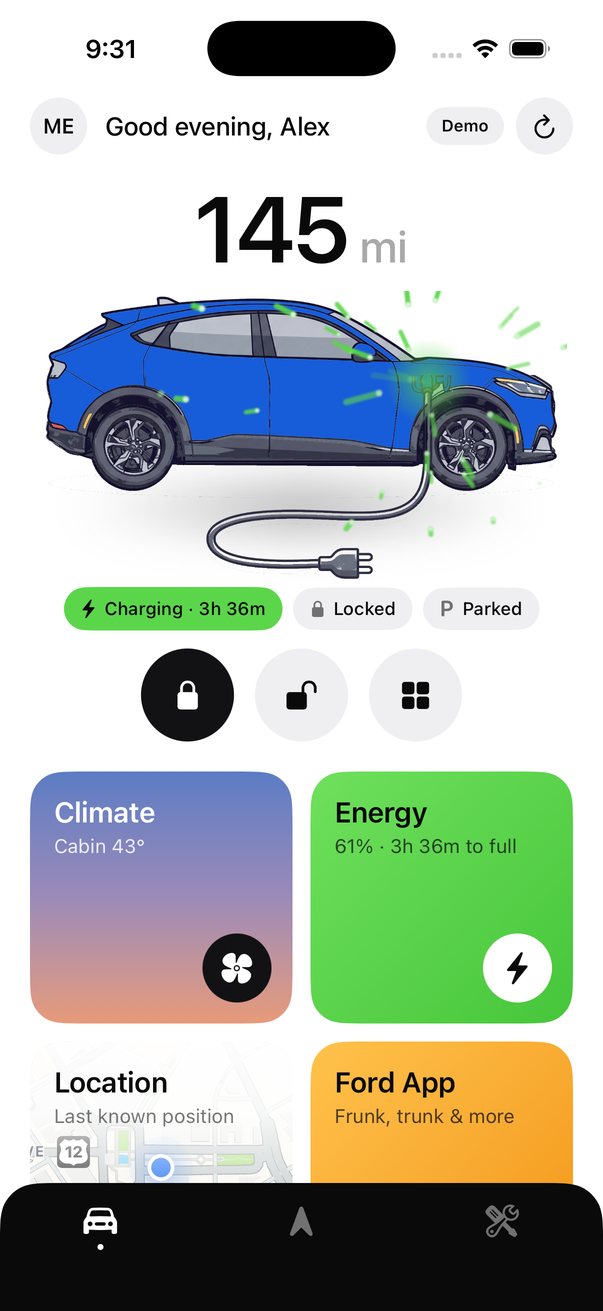
Charge level, estimated range and time-to-full as the first thing you see — not four taps deep. Charging cars roll the number like an odometer.
For the Mustang Mach-E
Range, lock, unlock and cabin preconditioning — on the first screen and on your home screen. Voltpony is a companion to FordPass, built for the five things you do every day.
iPhone · iOS 26 · free · no account with us
What it does
Not a reimplementation of FordPass. A short list, done quickly.
Charge level, estimated range and time-to-full as the first thing you see — not four taps deep. Charging cars roll the number like an odometer.
The three commands you actually use, on the home screen and on a home-screen widget. Unlock asks for confirmation by default; turn that off if it annoys you.
Pick from the factory Mach-E paints and the hero art matches. Name your car, set your own avatar, choose from five themes.
Where you parked, on a map, without opening a second app. Handy in a garage you didn't choose.
A charging map filtered to connectors a Mach-E can actually use, plus nearby dealers when something needs a human.
Lock and preconditioning run straight from the widget. No launching the app, no waiting for a splash screen.
Be honest about it
Voltpony is deliberately not a replacement. Some things only the official app can do, and pretending otherwise would just waste your time.
The app has a one-tap hand-off to FordPass so the gap costs you a tap rather than a hunt through your home screen.
Security
The most useful security property Voltpony has is architectural: I don't run any infrastructure, so there is no database of yours for anyone to steal — including me.
You sign in on Ford's own website inside a system-provided browser sheet. The app never sees, handles or stores your Ford password.
Access is stored in the iOS Keychain, marked device-only — so it is deliberately excluded from iCloud and iTunes backups. Restoring your backup onto another phone does not hand that phone your car.
No analytics SDK, no crash reporting service, no advertising identifier, no third-party dependencies in the app at all. Your VIN, your location and your driving stay on your device.
The app enforces its own request budget, backs off after repeated failures instead of retrying into a wall, and refuses to fire the same command twice in quick succession — all to keep your account's traffic looking unremarkable.
Deliberately not documented here: endpoints, identifiers and the specifics of the token exchange. If you're a security researcher with something to report, the support page has a contact address and I'd genuinely like to hear from you.
Early access
Voltpony is in TestFlight while it earns trust. Before you join, please read this — it's the single most important thing on this site.
Ford has locked accounts for unofficial API use. Create a separate FordPass account, add it to your Mach-E as a driver in the official app, and sign in to Voltpony with that account — not the login your vehicle ownership, warranty and service history are attached to.
Don't use a “+” address such as [email protected]; those have been auto-flagged as disposable. Voltpony rate-limits itself to keep your traffic unremarkable, but it cannot make this risk zero.
You'll need the TestFlight app from Apple. Beta builds expire every 90 days — you'll get a prompt to update.
Optional
Voltpony is free, has no ads and collects nothing about you — and it stays that way regardless of whether anyone tips. If it's saved you some time and you feel like buying me a coffee, the link's here. If not, genuinely, enjoy the app.
Buy me a coffeeHandled entirely by Ko-fi. No payment details ever reach this site, and nothing about a tip is linked to your app usage — there's no account here to link it to.
FAQ
Not yet, and I won't pretend otherwise. Voltpony is a native SwiftUI app, so an Android version means writing it again rather than porting it. It's on my list, but it's honestly gated on how much interest the iOS beta gets. If you want it, say so on the support page — that's the signal I'll go on.
It's a real risk and you should take it seriously. Ford has locked accounts for unofficial API use — both for very high request volumes and for traffic they simply judged anomalous. That's exactly why Voltpony tells you to sign in with a secondary Ford account added to your car as a driver, and why it rate-limits itself hard. It cannot make the risk zero. Nobody can.
Because if an account does get flagged, you want it to be a throwaway rather than the login your vehicle ownership, warranty and service history hang off. Making a second FordPass account and adding it as a driver takes about five minutes. Avoid “+” addressing like [email protected] — those were auto-flagged as disposable in a documented 2023 wave.
There is no Voltpony server. The app talks to Ford directly from your phone, and your credentials and vehicle data never touch any infrastructure of mine — because there isn't any. I could not read your car's location if I wanted to.
Those commands aren't exposed to third-party integrations at all — not to Voltpony, and not to any other unofficial app. That's a Ford-side limitation, not something I can work around. The app has a one-tap hand-off to FordPass for exactly this reason.
Yes, and you should assume it will happen eventually. Voltpony depends on interfaces Ford operates for its own app and has never published or promised to anyone. Ford can change, restrict or shut them off at any time, without warning and without owing anybody notice — and if they do, some features or the entire app stop working until I can adapt, if adapting is even possible. This isn't a hypothetical: it's the normal life cycle of every unofficial integration. Please don't buy anything, or rely on this app for anything that matters, on the assumption it will keep working.
It's built and tested against a 2023 Mustang Mach-E. Other Mach-E model years are very likely fine. Other Ford EVs may partly work since they share the same API, but I can't test them and I'm not claiming support.
Nothing. There's no subscription, no ads, no analytics SDK and no data to sell. It's a thing I built because I wanted it on my own phone.
Not currently. Publishing the client in full would mostly serve as a how-to for hammering Ford's API, which is the fastest way to get everyone's accounts flagged. Ask me on the support page if you have a specific reason to want it.